🎮 Create Squid Game-Inspired AI Art Without Design Skills
Easily create Squid Game-style AI art using your own photo and simple prompts. Step-by-step guide for fans and creators—no graphic design skills required.

- BackZee
- 3 min read
Why Squid Game’s Visual Style Captures the Imagination 🎭
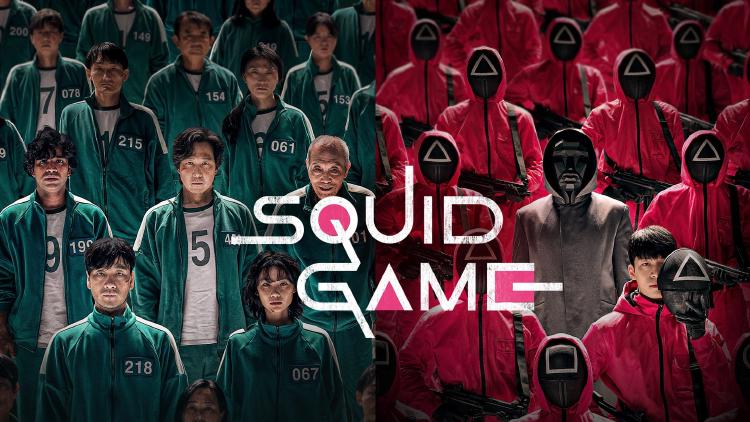
Squid Game became iconic for its unsettling playground visuals, harsh lighting, and the eerie contrast between childhood nostalgia and deadly competition.
Its distinct style—gritty, cinematic, and symbolic—is instantly recognizable and widely emulated by creators worldwide.
How AI Makes Squid Game Art Accessible to Everyone 🤖
AI image generators now allow anyone to replicate this cinematic style—no graphic design skills required. By uploading your photo and crafting a clear text prompt, you can create custom Squid Game-inspired art in minutes.
Step-by-Step: Create Your Own Squid Game Character
1. Open ChatGPT or another AI image generator
2. Upload your photo
3. Paste your prompt
4. Generate your image
Example Prompts to Get Started 🎬
1. Classic Contestant Look
Prompt Example:
“Transform this person into a Squid Game contestant. Keep the face exactly the same. Add a green tracksuit with a white number tag, dramatic indoor lighting, and background characters in similar outfits. The image should resemble a cinematic survival game scene.”
2. Promotional Poster Style
Prompt Example:
“A cinematic promotional poster for Squid Game. The person stands center wearing a green tracksuit with ‘456’ on the chest, surrounded by coffin-shaped black boxes tied with pink ribbons. Industrial floor, dramatic spotlight from above. Add bold white text: ‘THE FINAL GAMES BEGIN.’ Below: ‘SQUID GAME 3’ with a glitch effect. Include Netflix branding.”
3. Group Selfie on the Glass Bridge
Prompt Example:
“Create a vertical 9:16 fisheye group selfie with this person (player 00) in a green tracksuit. Surround them with characters Gi-hun (456), Sang-woo (218), Sae-byeok (067), Ali (199), Il-nam (001), and three masked guards. Set on the Squid Game Season 2 glass bridge. All characters smiling.”
Where to Use Your Squid Game AI Art
| Platform | Image Type | Purpose |
|---|---|---|
| Website Banner | Cinematic poster | Capture attention and set the theme |
| Blog Post | Character or scene recreation | Add visual depth and storytelling impact |
| Gallery Page | User photo transformations | Showcase creativity and inspire others |
| Social Media | Group selfies, memes | Boost engagement and shareable content |
Quick Tips for Better AI Results
- Be specific in your prompts: describe lighting, atmosphere, and clothing.
- Focus on cinematic qualities: camera angles, emotion, and background.
- Experiment with variations until you find the look you want.
⚡️ TL;DR (Because You’re Here for the Prompts, Not the Fluff)
- Upload a photo + drop a clear prompt = instant Squid Game vibes.
- No Photoshop, just smart AI prompts. Try these:
🔑 Quick Prompts to Copy:
➤ Contestant Look:
Put this person in a green Squid Game tracksuit with a white number, cinematic lighting, survival game scene background.
➤ Movie Poster Style:
Create a Squid Game poster. Person is in the center wearing a green tracksuit, surrounded by black coffin boxes with pink ribbons. Add spotlight and bold title text: 'THE FINAL GAMES BEGIN.'
➤ Glass Bridge Selfie:
Make a fisheye group selfie on the Squid Game glass bridge. Include me as player 00, plus Gi-hun, Sang-woo, Sae-byeok, Ali, Il-nam, and 3 masked guards. All smiling.
- Bonus tip: Be vivid with lighting, camera angles, and mood. AI reads your words like stage directions.
Final Thoughts: AI Art Meets Pop Culture Creativity 🎨
AI tools let anyone reimagine themselves in the worlds of their favorite shows. Squid Game’s visual identity makes it the perfect playground for creative experiments.
Ready to transform your photo? Your Squid Game character is just one prompt away.
#SquidGameAI #AICreators #PopCultureArt #PromptEngineering #CinematicAI